Accessing the Proctortrack site
Make sure to use only the links provided in the emails from your institution to access the Proctortrack site. These links connect you to the right site that will recognise your login details.Logging in for the first time
When you log in to Proctortrack for the first time:- Make sure to enter the correct email address in the email field
- Copy and paste the password from your institution’s email into the password field – make sure not to copy any extra spaces before or after the password
Resetting your password
If you’re still unable to log in, reset your password by folowing these steps:-
Select the Forgot password link on the Proctortrack login screen.

-
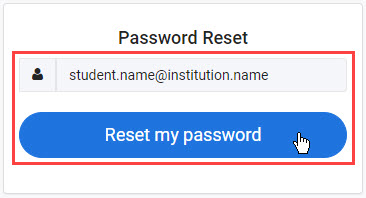
Enter your email and then select Reset my password.
-
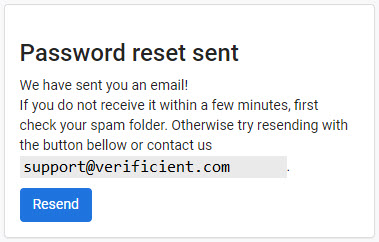
A password reset email will be sent to your email address. Follow the instructions in the email to reset your password.
Contact the Proctortrack support team:
- By using the chat option at the bottom of the screen on the Proctortrack website.
- Via the Proctortrack support page https://www.proctortrack.com/support/
Before your first proctored (video supervised) test, you will be instructed to submit scans of your face and your photo identification.
Once these scans are processed to verified that they match, an encrypted baseline identity profile is created and stored for up to 365 days.
At the start of each proctored test, you will need to submit a face scan to be checked against your encrypted profile.
- The name and date of the test you are enrolled in
- The reason you missed the deadline
- Fails, you will be notified via email. Make sure you retake the onboarding test and resubmit your scans as soon as possible.
- Passes, you will be emailed test details at least 24 hours before your scheduled main event test.
If your baseline identity verification fails, you will receive an email notifying you that your onboarding scans have been rejected. The email will include the reason for the rejection.
Make sure you retake your onboarding test as soon as possible and take the reasons your previous scans were rejected into consideration, to help avoid your scans being rejected again.
Helpful tips:
- Follow the guidelines presented on the Proctortrack app to take a perfect scan each time
- Clean your camera lens with a soft cloth
- Make sure the room is well lit
- Keep the background as plain as possible
- For your face scan keep your head approximately 30-45 centimeters away and centered to the computer screen
- Take your time to review and confirm that your face scan and identification scan:
- Are clear and the text on your identification can be read
- Can be used to verify that you are the same person in both
- The name and date of the test you were enrolled in
- The reason you missed the test