View a list of candidates
The EDIT drop-down on the instructor dashboard can be used to view a list of candidates, including each candidate’s username and initial password.
Tip
While it’s also possible to add or edit candidates via the EDIT drop-down, these tasks are generally undertaken by Janison.
To view a list of candidates:
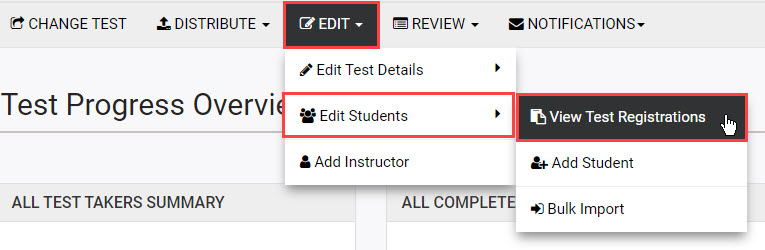
- On the instructor dashboard, select EDIT then hover over Edit Students in the drop-down and select View Test Registrations.
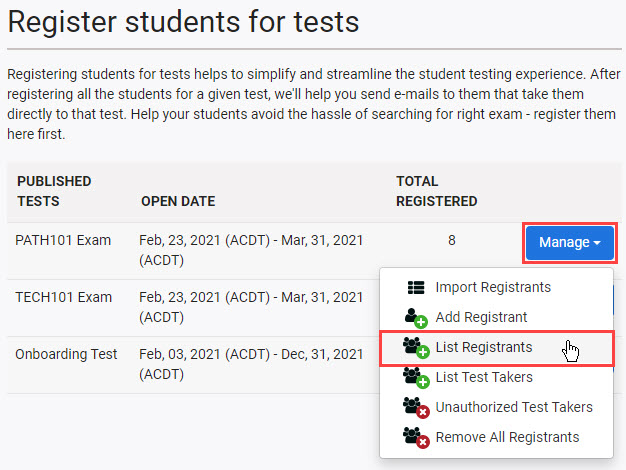
- On the Register students for tests screen, select Manage next to the required test and then choose List Test Takers.
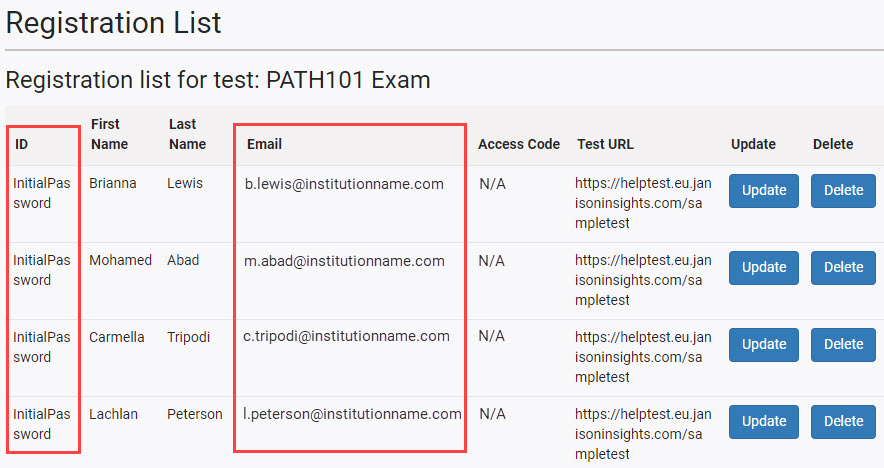
- The Registration List screen displays, showing a list of candidates who are enrolled in the selected test.
- The Email shown for a student is their Proctortrack username
- The ID shown is the initial Proctortrack password that was set for the candidate
Tip
Note that the password displaying in the ID column is the candidate’s initial password. If a candidate changes their password, it will not display here.
Candidates are prompted to reset their password the first time they log in to Proctortrack. If a candidate forgets their new password, they will need to reset it by using the Forgot password link on the Proctortrack login screen.
