To add a custom view attribute:
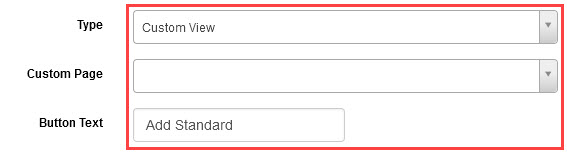
- Select Custom View from the Type drop-down field.
- Select a previously-built custom page from the Custom Page drop-down field.
- Enter text to show on the button for the custom view in the Button Text field.
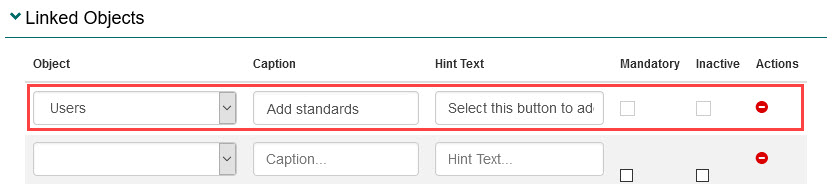
- Select the Linked Objects expandable section and then complete the following for each place the custom attribute needs to display:
- Select the system object from the Object drop-down field. This is where the custom view button will display for end users.
- Enter text into the Caption field. This text will be the label next to the custom view button.
- Enter text into the Hint Text field (optional). This will provide the end user with a hint when they hover over the Hint question mark icon next to the custom attribute.
- Select the Mandatory checkbox to set the custom view button as an item that must be completed (optional).
- Select the Inactive checkbox next to a linked system object (optional). This will set the link as inactive and the custom view button will not be shown to end users in this location.
- To remove a link between a system object and the custom attribute, select the Remove icon next to it.

- Select Save Custom Attribute.
Tip
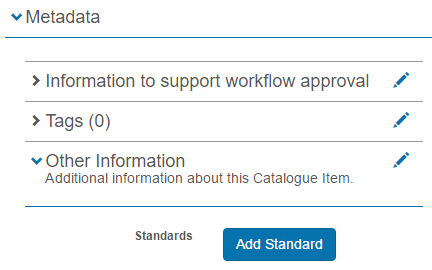
In this example, Catalogue Item was selected as the system object was to link with the custom attribute. For a custom attribute to be used in a catalogue item, the attribute must first be linked to a custom attribute set, to allow logical organisation of custom attributes within the catalogue item’s metadata. Refer to the section Add a custom attribute set for more information on adding custom attributes to a custom attribute set.
In our example, the example Standards Selector custom view was added to a custom attribute set and is now available in the Metadata expandable section when creating a catalogue item. The Author creating the catalogue item can select the button to undertake the tasks set up in the custom page: