Introduction to People Management
The People area of the system is where you manage users and organise them into a structure that suits your organisation’s needs. This structure is built on a hierarchy of Organisations and Organisation Units, with additional flexibility provided by Groups.
Core Components
- Users are the individuals who access and use the system. Each user is assigned to an Organisation and an Organisation Unit.
- Roles are assigned to users to define their access and permissions within the system.
The Organisational Hierarchy vs. Groups
While the organisational hierarchy provides a top-down structure (e.g., faculties and departments), Groups offer a flexible way to categorise users across this structure. Groups allow you to form cohorts or working teams that can transcend departments or even exist completely outside the formal hierarchy.
Riverside Uni Example
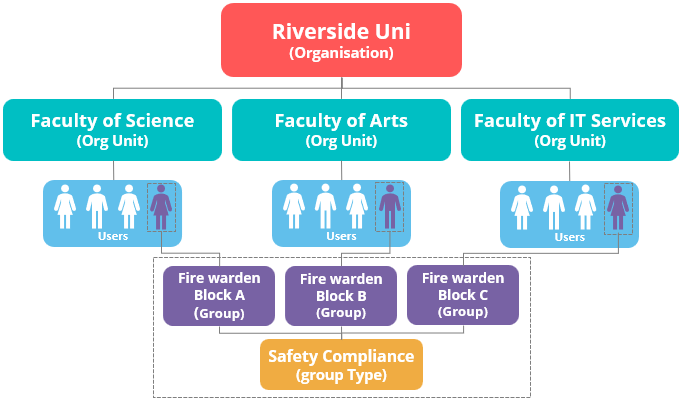
The provided diagram illustrates how these components work together at Riverside Uni.
- Organisational Hierarchy: Riverside Uni is the top-level Organisation, with three Organisation Units below it: the Faculty of Science, Faculty of Arts, and Faculty of IT Services. Each faculty contains a number of users.
- Groups: The diagram shows that users from all three faculties are members of a specialised Group Type called Safety Compliance. Within this type, there are three specific Groups: “Fire warden Block A,” “Fire warden Block B,” and “Fire warden Block C.” This demonstrates how groups can draw members from different parts of the organisational hierarchy to form a working group for a specific purpose, such as safety compliance.