How it works
In enrolment-based marking, each test-taker’s set of responses is called a script.
Markers review and score these scripts as they come in, instead of waiting for the test window to close.
When a script is marked and finalised, the system immediately updates that individual’s result. How those results are shared depends on the organisation’s setup. Test-takers might receive their results:
- via the Candidate Dashboard in Janison Insights
- via the organisation’s own channels
Administrators can continue marking new scripts at any time, and the results view updates automatically.
Key differences from standard marking
Feature | Enrolment-based marking | Standard marking |
Marking start time | Marking can begin as soon as scripts are submitted. | Marking begins only after all tests are completed and the test window has closed. |
Workload | Markers can work continuously as scripts arrive. | Marking workload occurs in a concentrated period after testing. |
Test window | Suitable for rolling or open test periods. | Best for fixed test sessions. |
Quality controls | Includes seed scripts to check that markers apply the marking standard consistently. | Includes a wider range of quality controls such as standardisation, blind quality monitoring, double marking, and sampling. |
Timing of results | Results are released progressively as each script is completed and marked. | Results are released only after all marking is finished. |
What’s different for markers
Markers still use the same familiar marking tools and workflows.
The main difference is that scripts appear gradually as enrolments are submitted, rather than all at once when testing ends.
Monitoring progress
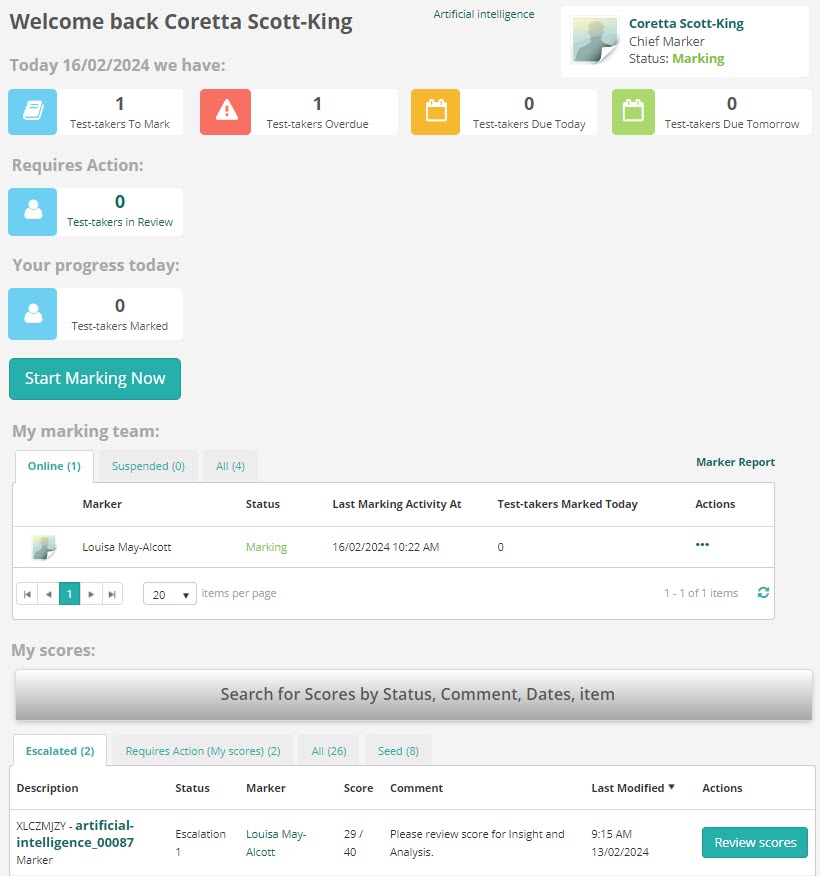
The Marking Dashboard provides a live overview of marking progress. The information displayed varies depending on each user’s role within the marking team.
From the dashboard, you can jump directly into individual scripts for review or moderation.
When to use enrolment-based marking
Choose enrolment-based marking when:
- Your testing window is open or runs over multiple days.
- You want marking to commence as scripts come in, instead of waiting for the test window to close.
- You want results released as soon as they’re ready.
- Real-time progress tracking helps manage marking or reporting.
Avoid using it for events where results must be released to all test-takers simultaneously.